Steven Pemberton, CWI Amsterdam
Version: 2020-07-04.
Submission, the process of sending data to a server and dealing with the response, is probably the hardest part of XForms to implement, and certainly involves the XForms element with the most attributes. This is largely due to legacy: XForms was designed to work with existing standards, and HTTP submission was designed before XML existed: the data representations are several, and on occasion byzantine.
Part of the process of producing a standard such as XForms is a test suite to check implementability of the specification. The original XForms test suite consisted of a large collection of XForms, one XForm per feature to be tested. These had to be run by hand, and the output inspected to determine if the test had passed.
As a part of the XForms 2.0 effort, a new test suite is being designed and built. This tests features by introspection, without user intervention, so that the XForm itself can report if it has passed or not. Current work within the test suite is on submission.
This paper gives an overview of how the test suite works, and discusses the issues involved with submission, the XForms approach to it, and how to go about introspecting something that has left the client before you can cast your eyes on it.
Cite as: Steven Pemberton, “How Suite it is: Declarative XForms Submission Testing.” In Proceedings of Balisage: The Markup Conference 2020. Balisage Series on Markup Technologies, vol. 25 (2020). https://doi.org/10.4242/BalisageVol25.Pemberton01.
XForms is a declarative programming language being developed under the auspices of W3C. Versions 1.0 [XF1] and 1.1 [XF11] had a test suite to test the implementability of the specification [XFTS1], and to allow implementors to check their implementations. However, it was difficult to use: each test was a separate XForm for testing one feature, and not only did they have to be run one-by-one by hand, but the output had to be inspected to determine if the results were correct.
XForms 2.0 is in preparation [XF2], and along with it a new test suite [XFTS2], as sketched in [FaC], and further described in [XF2TS], where not only are the tests run automatically, but the tests, through introspection, largely announce themselves if they have passed or not (though there are a few cases where human inspection is still needed, such as whether physically clicking on a button with a mouse actually works, or whether the function that returns the current time returns the correct value).
The test suite is one large XForm that reads an XML description of the tests, and then loads and runs the tests one by one, or allows individual tests to be selected for running. Each test specification contains details of the test, such as its name, the section of the specification it is testing, and a description of its purpose.
<testsuite spec="XForms 2.0" version="0.4">
   <chapter number="1" name="about" title="About XForms"/>
   <chapter number="2" name="introduction" title="Introduction to XForms">
      <test name="2.1.a" spec="concepts-xhtml">Introductory Example No. 1</test>
      <test name="2.2.a" spec="concepts-xml-instance-data">Example: Encapsulation</test>
      <test name="2.3.a" spec="concepts-model">Example: Value Constraints</test>
      <test name="2.4.a" spec="concepts-multiple">Example: Multiple Forms</test>
   </chapter>
   <chapter number="3" name="structure" title="Document Structure">
      <test name="namespace" spec="structure-namespace">XForms namespace</test>
      <test name="3.2.1.a" spec="structure-attrs-common">id attribute</test>
      <test name="3.2.1.b" spec="structure-attrs-common">foreign attributes</test>
      ...
Each test is then a separate XForm containing any number of cases to be tested, largely using a standard template. This template includes an instance containing test cases:
  <tests pass="" xmlns="">
     <description title="days-from-date()">days-from-date() function</description>
     <test pass="" res="" req="-1">1969-12-31</test>
     <test pass="" res="" req="0">1970-01-01</test>
     <test pass="" res="" req="1">1970-01-02</test>
     <test pass="" res="" req="4">1970-01-05T01:01:01.01Z</test>
     <test pass="" res="" req="364">1970-12-31</test>
     ...
Each test case has (optional) values in its content used as parameters to
the test, an attribute called req that holds the required result,
an attribute called res to store the actual result, and an
attribute pass for recording if the test has passed. The top-level
tests element has an attribute pass that records if
all tests have passed. XForms bind elements are then used to set
up the test set. Calculating the results:
<bind ref="test/@res" calculate="days-from-date(..)"/>
Note that this single bind sets up all the tests.
Calculating whether the test has succeeded:
<bind ref="test/@pass" calculate="if(../@res = ../@req, 'yes', 'no')"/>
and whether all tests have succeeded:
<bind ref="@pass" calculate="if(//test[@pass!='yes'], 'FAIL', 'PASS')"/>
The content of the XForm then summarises the results:
<group>
   <label class="title" ref="description/@title"/>
   <output class="block" ref="description"/>
   <output class="{@pass}" ref="@pass"/>
   <repeat ref="test">
      <output value="."/> → <output ref="@res"/>
      <output class="wrong" ref="@req[.!=../@res]"/>
   </repeat>
</group>
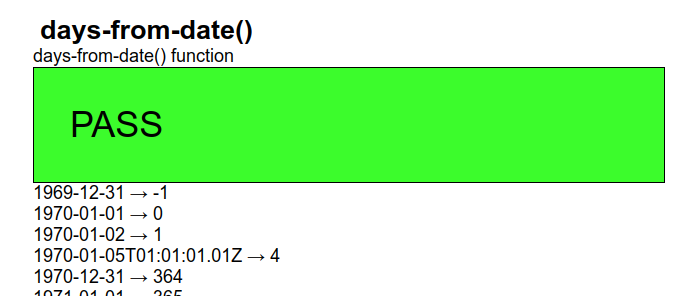
The output could then look like this:
A failure might look like this:
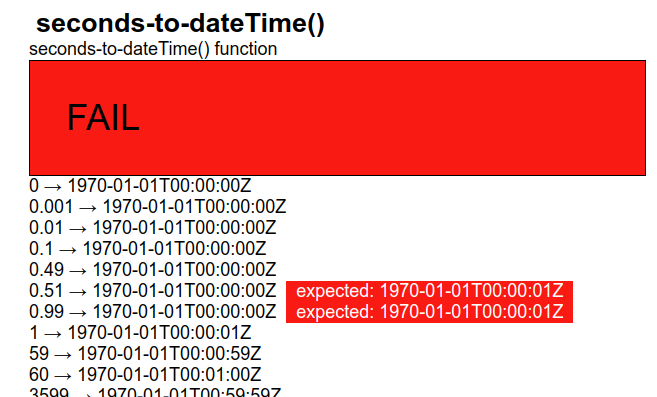
Although this example tests a function, other tests set the
@res attribute in different ways, as you will shortly see. More
details can be found in [XF2TS].
Submission, the process of sending data to a server and dealing with the response, is one of the harder parts of XForms to implement. This is partly due to the byzantine nature of HTTP submission [HTTP], which was designed before there were standardised data structures for the web, and partly just because there are lots of options.
Submission is also hard to test, because the very thing you want to test has left the client before you get a chance to introspect.
Submission in XForms has a number of steps that have to be performed by the implementation:
Since the result of the serialization leaves the client without the possibility of introspection, there needs to be a method of getting the serialization back into the client for checking.
The original testsuite used a server with a special echo CGI
URI, that caused the submitted serialization just to be returned unchanged to
the client in the response body:
action="http://xformstest.org/cgi-bin/echo.sh"
so that submission tests submitted the data, and then displayed the result, which the tester would have to inspect.
This solved part of the problem, but another problem was that very few webservers actually implement all of HTTP, and while we are not testing servers, we need to test that XForms implementations correctly talk to servers that do implement all of HTTP.
Our solution has been to write a server [XContents] that supports all of HTTP, and can be run locally, allowing us to test whether the XForms implementation correctly implements all of the standard, while at the same time eliminating the need for an echo facility, since you can now just do a PUT followed by a GET.
The server is a fairly straightforward, non-industrial strength HTTP server that stores and serves files from the directory it is started up in, and below. It supports the following methods:
If it exists, the content is appended before the last closing tag, if any, and otherwise at the end.
Therefore, if you don't like the tags <post>...</post> when the file is created, you can first PUT an empty file, or one containing only the open and closing tags, e.g. <data></data>, before you POST to it.
The template for submission tests includes an instance for the data being submitted, and an instance to store the incoming response, and the form can then inspect the response to see that the result is correct.
<instance id="tests">
   <tests pass="" xmlns="">
      <description title="PUT and GET with @resource">
         Several tests require the server to handle the PUT method.
         This test PUTs a document, and then GETs it again,
         and checks it is the same.
         If this test fails, several later ones will as well.
         This also tests @replace="instance"
      </description>
      <test pass="" res="" req=""/>
   </tests>
</instance>
<instance id="result">
   <data xmlns=""/>
</instance>
To make sure that we are really getting the right result back, on start up
we initialise the req attribute to a random value, and then submit
the instance:
<action ev:event="xforms-ready">
   <setvalue ref="test/@req" value="random()"/>
   <send submission="put"/>
</action>
Where the submission called put is responsible for the
submission:
<submission id="put" resource="test.xml" method="put" replace="none"/>
There are two things that can happen in response to this: the submission succeeds, in which case we initiate retrieving the instance we just sent:
<action ev:event="xforms-submit-done">
   <send submission="get"/>
</action>
or, the submission fails, and we just set the result to an error message, and leave it at that:
<action ev:event="xforms-submit-error">
    <setvalue ref="test/@res"
              value="concat('xforms-submit-error on PUT: ',
                            event('response-reason-phrase'))"/>
</action>>
Since we want to catch these events as caused by the put
submission, we put them in the body of the submission:
<submission id="put" resource="test.xml" method="put" replace="none">
   <action ev:event="xforms-submit-done">
      <send submission="get"/>
   </action>
   <action ev:event="xforms-submit-error">
       <setvalue ref="test/@res"
                 value="concat('xforms-submit-error on PUT: ',
                               event('response-reason-phrase'))"/>
   </action>
</submission>
Note that an action element that contains a single sub-action
can be contracted. So this is the same:
<submission id="put" resource="test.xml" method="put" replace="none">
   <send ev:event="xforms-submit-done" submission="get"/>
   <setvalue ev:event="xforms-submit-error" ref="test/@res"
             value="concat('xforms-submit-error on PUT: ',
                           event('response-reason-phrase'))"/>
</submission>
In the case of success, the submission called get is initiated,
which GETs the resource, and stores it in the result instance.
Likewise it has two event listeners in its body: in the case of success, the
random number we generated earlier gets copied to the result attribute; in the
case of a failure, an error message:
<submission id="get" resource="test.xml" method="get" serialization="none"
            replace="instance" instance="result">
   <setvalue ev:event="xforms-submit-done" ref="test/@res"
             value="instance('result')/test/@req"/>
   <setvalue ev:event="xforms-submit-error" ref="test/@res"
             value="concat('xforms-submit-error on GET: ',
                           event('response-reason-phrase'))"/>
</submission>
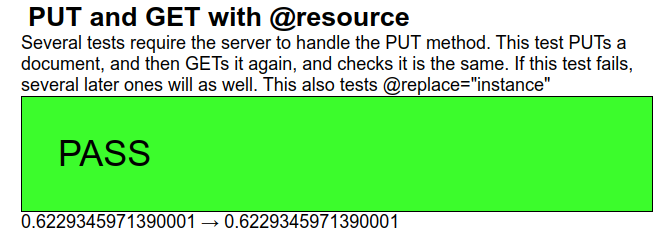
Here are examples of output. Note that this uses exactly the same output code as the earlier template.
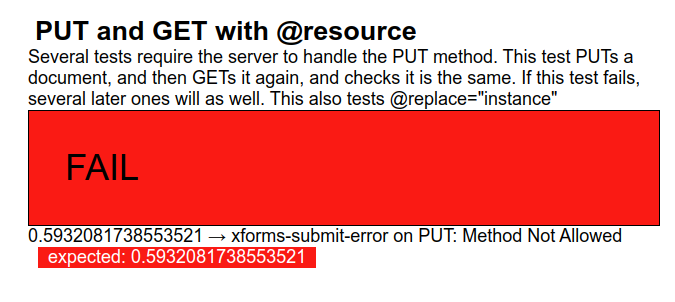
A failure case of a server not supporting PUT:
(Earlier tests had already tested features such as the correct events being sent on completion).
Submitting no data should generate an xforms-submit-error event
with an error-type of no-data. So the submission
element references a non-existent element (ref="nodata"), and
since we expect the submission to fail, we don't care which URI it gets sent to
(resource="doesntmatter"), and just in case it does succeed for
whatever reason, we say we want any returned result to be ignored
(replace="none"):
<submission ref="nodata" resource="doesntmatter" method="get" replace="none">
   <setvalue ev:event="xforms-submit-error"
             ref="test/@res" value="event('error-type')"/>
   <setvalue ev:event="xforms-submit-done"
             ref="test/@res">submission incorrectly succeeded</setvalue>
</submission>
A similar test can be used for attempting to submit invalid data.
When instance data is submitted, by default non-relevant data is elided. In this case we have data to submit:
<instance id="data">
   <tests pass="" xmlns="">
      <description title="Submission with relevance">
        Check that only relevant data is submitted by default.</description>
      <test pass="" res="" req=""/>
      <test pass="" res="" req="nonrelevant"/>
      <test pass="" res="" req="nonrelevant"/>
   </tests>
</instance>
We mark some elements as non-relevant:
<bind ref="instance('data')/test" relevant="@req!='nonrelevant'"/>
Initialise with a random number as before, and submit:
<action ev:event="xforms-ready">
   <setvalue ref="instance('data')/test[1]/@req" value="random()"/>
   <send submission="put"/>
</action>
<submission id="put" ref="instance('data')" resource="test.xml"
            method="put" replace="none">
   <send ev:event="xforms-submit-done" submission="get"/>
   <setvalue ev:event="xforms-submit-error" ref="test/@res"
             value="concat('PUT xforms-submit-error: ',
                           event('response-reason-phrase'))"/>
</submission>
and GET it back, replacing the main instance:
<submission id="get" resource="test.xml" method="get" serialization="none"
            replace="instance" instance="tests">
   <setvalue ev:event="xforms-submit-done" ref="test[1]/@res"
             value="instance('data')/test[1]/@req"/>
   <setvalue ev:event="xforms-submit-error" ref="test/@res"
             value="concat('GET xforms-submit-error: ',
                           event('response-reason-phrase'))"/>
</submission>
Values that were not relevant in the source data should not appear in the result.
One of the possible ways of serialising data to the server is as part of the URI, and this is often the case with the GET method. Introspecting this is easier, because the event to signal success or failure contains the initiating URI. So we prepare some data:
<data xmlns="">
   <value attr="">one</value>
   <text attr="attr" ibute="ibute">ual</text>
   <number>3.14159</number>
</data>
And submit it. We don't care if the submission succeeds or fails, because both events contain the URI we want:
<submission id="get" ref="instance('data')" resource="test.xml" method="get" replace="none">
    <setvalue ev:event="xforms-submit-error" ref="test/@res"
              value="event('resource-uri')"/>
    <setvalue ev:event="xforms-submit-done" ref="test/@res"
              value="event('resource-uri')"/>
</submission>
The testcases instance contains the serialization we are expecting to see:
<tests pass="" xmlns="">
<description title="Serialization on GET with three values">
With GET, serialization is done in the URI in a simplified fashion. T
his tests several facets of values.</description>
<test pass="" res="" req="test.xml?value=one&text=ual&number=3.14159"/>
</tests>
The testsuite is a work in progress. Many tests have still to be added, which is a top priority, followed by further work on the test infrastructure, in particular storing the results of tests, which with the server accepting the PUT method is now greatly easier.
One aspect that will have to be treated differently is the generation of HTTP headers. These are hidden in the protocol, and not part of the content and therefore hard to test. While headers returned from the server are accessible to an XForm, headers sent by the implementation are not. An addition to the server will probably have to be added in order to be able to gain access to those parts of the protocol.
Self-testing through introspection is a great help to those needing to test implementations, making their life much easier. The XForms 2 test infrastructure also makes it easier to add and update tests. Although testing submission has a number of challenges compared with other parts of an XForms implementation, even these can be overcome using a fairly standard approach, without too much overhead.
[XF1] Micah Dubinko et al. (eds.), XForms 1.0, W3C, 2003, http://www.w3.org/TR/2003/REC-xforms-20031014/
[XF11] John M. Boyer (ed.), Forms 1.1, W3C, 2009, http://www.w3.org/TR/2009/REC-xforms-20091020/
[XF2] Erik Bruchez et al. (eds.), XForms 2.0, W3C, 2020, https://www.w3.org/community/xformsusers/wiki/XForms_2.0
[XFTS1] Steven Pemberton (ed.), XForms Test Suites, W3C, 2008, https://www.w3.org/MarkUp/Forms/Test/ .
[XFTS2] Steven Pemberton, XForms 2.0 Test Suite, CWI, Amsterdam, 2020, https://www.cwi.nl/~steven/forms/TestSuite/
[FaC] Steven Pemberton, Form, and Content, Proc. XML Prague 2018, https://archive.xmlprague.cz/2018/files/xmlprague-2018-proceedings.pdf#page=225
[XF2TS] Steven Pemberton, The XForms 2.0 Test Suite, MarkupUK 2018, https://markupuk.org/2018/Markup-UK-2018-proceedings.pdf#page=157
[XContents] Steven Pemberton, XContents: A minimal fileserver over HTTP. CWI, 2020, https://github.com/spemberton/xcontents
[http] R. Fielding et al. (eds.), Hypertext Transfer Protocol (HTTP/1.1), Internet Engineering Task Force (IETF), 2014, https://tools.ietf.org/html/rfc7231