Steven Pemberton, CWI, Amsterdam
XForms 1.0 and 1.1 both had test suites that consisted largely of static XForms documents [test1]. To run the tests you had to manually activate them one by one, and then visually confirm that the output matched the description of what should have been produced. If you wanted to add more cases to a test, it involved adding to the set of documents, or editing the individual documents.
The test suite for XForms 2.0 now being constructed [test2] takes a different approach, the idea being that the tests should check themselves that they have passed; most tests have a similar structure so that only the data used needs to be altered to check new cases.
Of course, for a language designed for user-interaction, some tests have to be based on physical interaction. But once you have confirmed that clicking on a button does indeed generate the activation event, all subsequent tests can generate the activation event without user intervention.
The introspection needed for tests to check the workings of the processor doing the testing can raise some challenging problems, such as how to test that the initial start-up event has been sent when the facilities for recording that fact have not yet been initialised.
This paper considers the techniques used to create a self-testing XForms test suite, some of the problems encountered, and gives examples of how some of them were solved.
Cite as: Steven Pemberton, "The XForms 2.0 Test Suite", Proc MarkUp UK 2018, pp 157-167, https://markupuk.org/2018/Markup-UK-2018-proceedings.pdf#page=163.
XForms [xf1] is a W3C standard XML-based markup language which, as the name would lead you to expect, was originally designed for a new generation of forms on the Web. Indeed, version 1 was exactly that, and to a large extent mirrored what could be achieved with HTML forms, while adding extra facilities. However, after a short period of experience, it was realised that with a small amount of generalisation, XForms would be suitable for other sorts of interactive applications as well.
And so was born XForms 1.1, a declarative, Turing-complete programming language, applicable for interactive applications (and forms) both on and off the web.
Since then XForms has been used by a broad, international user population, from small companies to multinationals, with more than six implementations available from around the world.
One of the surprises has been that experience has repeatedly shown that using XForms for applications reduces application development time by an order of magnitude, with concomitant reductions in cost. This is largely thanks to the declarative style of programming that XForms uses: much of the administrative side of regular procedural programming is taken care of automatically by the XForms system.
Now, XForms 2.0 is in development [xf2], a further generalisation of the previous version.
The essence of XForms is state, which means that it meshes extremely well with the REST (Representational State Transfer) architectural style [REST].
An XForms application has two parts: a model, and a user-interface.
The model contains all the data being used, stored in instances, along with descriptions of properties of, and relationships between, the data. For instance, data can be defined inline:
<instance>
   <tests xmlns="">
      <test pass="" res="" req="valid">2018-01-20</test>
      <test pass="" res="" req="invalid">2018/01/20</test>
   </tests>
</instance>
or can be imported from an external source:
<instance src="tests.xml"/>
Descriptions of data properties are done using bind statements that bind properties to data values:
<bind ref="today" type="date"/>
<bind ref="color" readonly="../variant="'basic'"/>
<bind ref="state" required="../country="'USA'"/>
<bind ref="state" relevant="../country="'USA'"/>
<bind ref="total" calculate="../number * ../unitprice"/>
<bind ref="height" constraint=". > 0"/>
Controls in the user-interface then bind to the data to allow interaction:
<input ref="age" label="Age:"/>
After initialisation the system is in stasis: the data matches the descriptions, and the relationships between data are up-to-date. After that, events occur, either system-generated or user-initiated, causing data values to change, to which the XForms system responds in order to return the system to stasis. While in general the system responds to events in standard ways, applications can also catch events and specify actions that define how to respond to particular events in particular ways:
<action ev:event="xforms-value-changed">
   <setvalue ref="unsaved">true</setvalue>
</action>
As a --simple-- example, a map application might keep the x and y coordinates of a location and a zoom level for looking at the map:
<instance>
   <map xmlns="">
      <zoom>10</zoom>
      <x>511</x>
      <y>340</y>
      <url/>
   </map>
</instance>
The URL of the relevant map tile for that location can then --automatically-- be kept up-to-date whenever and however any of the values change, by using a bind:
<bind ref="url"
      calculate="concat('http://tile.openstreetmap.org/',
                        ../zoom, '/', ../x, '/', ../y, '.png')"/>
See [intro] for a further introduction to XForms, and [maps] for a fully worked-out mapping application in XForms.
As part of the process of defining a new standard, it is recognised good practice to define a test suite to go along with the specification. The principle reason for having a test suite of course is to allow implementers to check that their implementations correctly interpret the definitions in the specification. However, users of implementations can gain confidence in the implementation they use by seeing the results from the test suite. And finally, it is useful for the specification writers themselves: by forcing them to think of test examples, it can expose corners of the specification that have not yet been sufficiently well defined.
The original XForms 1.0 and 1.1 test suites [test1] were defined as a large collection of files, each file testing one feature of the language. Each test consisted of some output, plus a description of what you should see if the test had passed. Problems experienced with this approach included:
The problems experienced with the earlier versions of the test suite led us to approach the test suite for the new version of XForms in a totally different way.
Firstly, the test suite is now One Big XForm, that loads the details of the tests into an XForms instance, and uses that to drive the test suite interface, running the tests as sub-forms . The tests are divided over the chapters of the specification, and each chapter contains a test case for each feature, each test case containing any number of tests for that feature.
The interface allows you to step through the chapters, or to select a particular chapter, and for each chapter to step through the tests, or select a particular test.
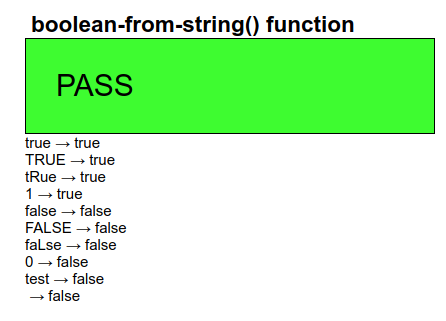
Secondly, as far as possible, the tests are all self testing: apart from a description of what is being tested, and the output of the results, tests include a big green PASS or a big red FAIL indication at the top of the output, signifying whether the output values match with what was expected, with each individual failing test within that one test case also being flagged.
However, not all tests can be self-testing. Of course, for a language designed for user-interaction, some tests have to be based on physical interaction: for instance, does clicking on a button generate the correct event? But once you have confirmed it does indeed, subsequent tests can generate the activation event without user intervention.
Similarly, some tests can only be confirmed by inspection: does the
now() function indeed generate today's date and time? Once you
have confirmed that, other tests that depend on the date and time can use that
function without further inspection.
Some tests are particularly introspective. Are expressions evaluated in the correct evaluation context? Such tests are particularly hard to formulate, since the very act of introspection alters the context that they are being evaluated in.
Finally, testing initialisation can be tricky, because before the system has initialised, there is little you can do.
Despite the caveats above regarding tests that cannot be tested automatically, the vast majority can, and almost all use a standard template.
To demonstrate the workings of this template, let us consider an example
test case for a function, in this case for the function
boolean-from-string().
We want to test that a function calls such as
boolean-from-string('true') return the correct result.
To do this, the parameter value is enclosed in an element:
<test>true</test>
and we add attributes where the required result, the actual result, and whether the test case passes or not will be stored:
<test pass="" res="" req="true">true</test>
As many such test cases as necessary are then gathered together in an instance:
<instance>
   <tests pass="" name="boolean-from-string() function" xmlns="">
      <test pass="" res="" req="true">true</test>
      <test pass="" res="" req="true">TRUE</test>
      <test pass="" res="" req="true">tRue</test>
      <test pass="" res="" req="true">1</test>
      <test pass="" res="" req="false">false</test>
      <test pass="" res="" req="false">FALSE</test>
      <test pass="" res="" req="false">faLse</test>
      <test pass="" res="" req="false">0</test>
      <test pass="" res="" req="false">qwertyuiop</test>
      <test pass="" res="" req="false"></test>
      ...
   </tests>
</instance>
A bind is then used to calculate the individual results:
<bind ref="test/@res" calculate="boolean-from-string(..)"/>
whose effect is to calculate the res attribute for all
test elements.
Another bind, independent of which function is being tested, calculates if the computer result matches the expected value:
<bind ref="test/@pass" calculate="if(../@res = ../@req, 'yes', 'no')"/>
and finally a bind for the attribute on the outmost element records if all tests have passed:
<bind ref="@pass" calculate="if(//test[@pass!='yes'], 'FAIL', 'PASS')"/>
which says that if there is a test element whose
pass attribute does not have the value yes, then the
test set fails, and otherwise it passes. We may in future also add a percentage
pass value, that counts the number of passed tests:
<bind ref="@percent" calculate="100*count(//test[@pass='yes']) div count(//test)"/>
With this structure, every test form has an identical set of controls, that output the name of the test, an optional description (which, following XForms rules, is only displayed if present in the instance), whether all tests have passed, for quick inspection, and the list of each test with an indication of what was expected when it has failed:
<group>
   <label class="title" ref="@name"/>
   <output class="block" ref="description"/>
   <output class="{@pass}" ref="@pass"/>
   <repeat ref="test">
      <output value="."/> → <output ref="@res"/>
      <output class="wrong" ref="@req[.!=../@res]"/>
   </repeat>
</group>
Note that with the statement
<output class="wrong" ref="@req[.!=../@res]"/>
this only selects the req attribute if its value does not match
that of the res attribute on the same element. If they match, the
req is not selected, and nothing is output.
This looks like this when run:
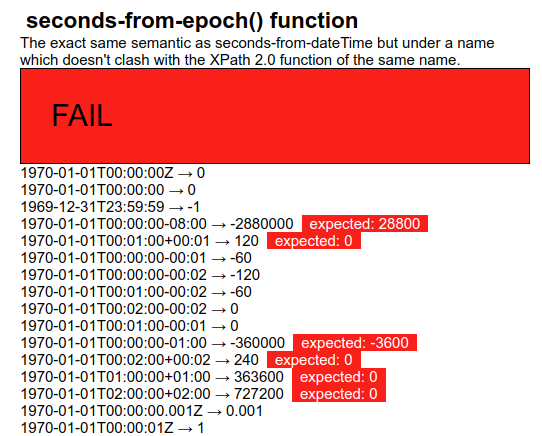
Here is an example of a fail (and in this case with a description as well):
If we want to test a function with more than one parameter, we structure the
test elements slightly differently, for instance for the
compare() function which has two parameters, by enclosing each
parameter in an element of its own:
<test pass="" res="" req="-1">compare(<a>apple</a>, <b>orange</b>)</test>
and then modify the bind that calculates the results:
<bind ref="test/@res" calculate="compare(../a, ../b)"/>
Note that in the general template structure, these are the only places where there are differences between test cases: in the data, and in the bind calculating the result. The rest remains identical.
To test datatypes, we want to do something similar. We can collect in the
test elements a, possibly large, group of values of the datatype
to be tested, and then see if the system thinks they are valid values for that
type. For instance for the date datatype:
<test pass="" res="" req="invalid"/>
<test pass="" res="" req="valid">2018-01-20</test>
<test pass="" res="" req="invalid">2018/01/20</test>
<test pass="" res="" req="valid">-2018-01-20</test>
<test pass="" res="" req="invalid">+2018-01-20</test>
<test pass="" res="" req="invalid">02018-01-20</test>
<test pass="" res="" req="valid">12018-01-20</test>
and so on, and then calculate with the bind for the results:
<bind ref="test/@res" calculate="if(valid(.), 'valid', 'invalid')"/>
This would work fine, but for our purposes it has a difficulty. The
valid() function is an XForms 2.0 addition, and we want as litttle
as possible of the test suite infrastructure to depend on XForms 2.0 features
-- if anything is likely to fail it is the new features of the language before
the old features; all the more so since many of the tests will still work with
older versions of XForms and so can still be used on older implementations.
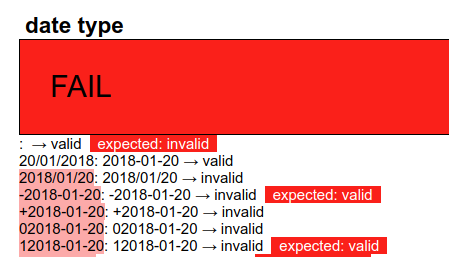
In XForms 1.1 (and later), if a control is bound to a value, and its value changes, an event is dispatched to the control announcing its validity. The standard XForms response is to change the display of the value to make it clear that it is now newly valid or invalid, but we can catch the event and record that it has happened for that value. The only difficulty that we have to deal with is that the event is only generated when the value changes.
So what we do is initially set the test value to some random value, it doesn't matter what it is, nor whether it is a valid or invalid value for the datatype, and when the system has initialised, only then change all the values to the data we are actually interested in. Then when the value changes, and the event is generated, we catch it and save the result. Something along these lines:
Store the value we are interested in in an attribute:
<test pass="" res="" req="valid" val="2018-01-20"/>
Add an attribute to the root element to record whether the system has been initialised yet:
<tests pass="" started="" name="date type" xmlns="">
And then use a bind to calculate the value of the elements:
<bind ref="test" type="date" calculate="if(../@started='', 'xxx', @val)"/>
This ensures that initially the test elements have the value
'xxx', until the started attribute is changed, which we do on
initialisation, by catching the xforms-ready event:
<action ev:event="xforms-ready">
   <setvalue ref="@started">yes</setvalue>
</action>
Then in the output section, we can catch the validity events, and record them:
<repeat ref="test">
   <output ref=".">
      <action ev:event="xforms-valid">
         <setvalue ref="@res">valid</setvalue>
      </action>
      <action ev:event="xforms-invalid">
         <setvalue ref="@res">invalid</setvalue>
      </action>
   </output>
   ...
Which might look like this:
In the previous example, we saw some events that happen during processing:
the xforms-ready event that is dispatched when the system has
finished initalising, and the xforms-valid and
-invalid events that are dispatched when a value bound to a
control changes.
In fact, when such a value changes several states are announced via events: whether the control is enabled or not, whether the value is optional or required, whether the value is readonly or not, as well as the two we have already seen. The test to check that these events are sent correctly starts by assembling test values that are all zero:
<test pass="" res="" req="disabled">0</test>
<test pass="" res="" req="enabled">0</test>
<test pass="" res="" req="optional">0</test>
<test pass="" res="" req="required">0</test>
<test pass="" res="" req="readwrite">0</test>
<test pass="" res="" req="readonly">0</test>
<test pass="" res="" req="valid">0</test>
<test pass="" res="" req="invalid">0</test>
and binding to the values properties, so that each positive property (such as valid) is the case when the value is 1, and the opposite property (such as invalid) is the case when the value is 0:
<bind ref="test/@req[.='enabled']"   relevant="..=1"/>
<bind ref="test/@req[.='disabled']"  relevant="..=0"/>
<bind ref="test/@req[.='valid']"     constraint="..=1"/>
<bind ref="test/@req[.='invalid']"   constraint="..=0"/>
<bind ref="test/@req[.='required']"  required="..=1"/>
<bind ref="test/@req[.='optional']"  required="..=0"/>
<bind ref="test/@req[.='readonly']"  readonly="..=1"/>
<bind ref="test/@req[.='readwrite']" readonly="..=0"/>
When initialisation is finished, all the test values are flipped to 1:
<action ev:event="xforms-ready">
   <setvalue iterate="test" ref=".">1</setvalue>
</action>
which causes all the properties to flip. The resultant events are then caught in the output section:
<repeat ref="test">
   <output ref="@req"><label>Event</label>
      <setvalue ref="../@res" ev:event="xforms-disabled" value="concat(., 'disabled')"/>
      <setvalue ref="../@res" ev:event="xforms-enabled" value="concat(., 'enabled')"/>
      <setvalue ref="../@res" ev:event="xforms-optional" value="concat(., 'optional')"/>
      <setvalue ref="../@res" ev:event="xforms-required" value="concat(., 'required')"/>
      <setvalue ref="../@res" ev:event="xforms-readwrite" value="concat(., 'readwrite')"/>
      <setvalue ref="../@res" ev:event="xforms-readonly" value="concat(., 'readonly')"/>
      <setvalue ref="../@res" ev:event="xforms-valid" value="concat(., 'valid')"/>
      <setvalue ref="../@res" ev:event="xforms-invalid" value="concat(., 'invalid')"/>
   </output>
   ...
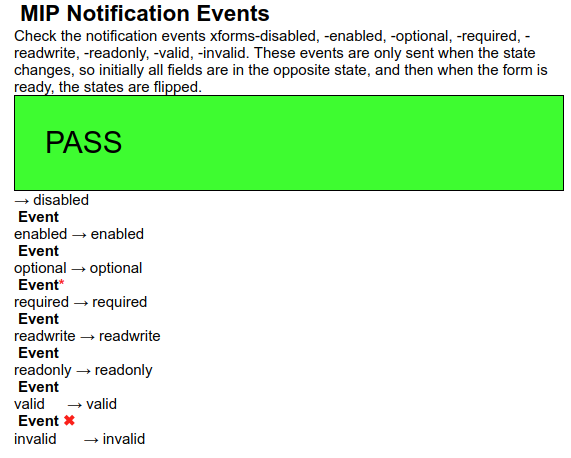
Note that by concatenating the result, we catch the case where the event is (incorrectly) sent more than once.
Here is an example of the output:
Actions often cause a change to the data. A good example of such an action
is insert, that inserts new elements or attributes into a data
structure.
After an insert, the system has to restore stasis, and goes through a number of steps to do that: rebuild: possibly updating internal data structures, recalculate: recalculating dependent values, revalidate: checking changed values for validity, refresh: updating the user interface.
At each step of restoring stasis an event is dispatched. Although seldom needed, these events allow applications to do extra steps if necessary.
Doing extra processing during these stages requires care, because, by definition, the system is not yet up to date. In particular, changing values during these stages necessitates you manually doing an extra recalculate afterwards, since the system may not be aware of the changes you have made. It also means for instance that we can't keep an index of how many events received, and use that to index into a list of events received.
So what we do, is start off with the test instance containing elements for the expected events, except the very last (refresh):
<test pass="" res="" req="insert"/>
<test pass="" res="" req="rebuild"/>
<test pass="" res="" req="recalculate"/>
<test pass="" res="" req="revalidate"/>
then on xforms-ready, we use insert to add the
missing element. With no further parameters, an insert on a list
just duplicates the last element, so we need to update the req
attribute:
<action ev:event="xforms-ready">
   <insert ref="test"/>
   <setvalue ref="test[last()]/@req">refresh</setvalue>
</action>
Then we catch all the events we are expecting, and store them at the locations they should be in if the events come in in the right order:
<action ev:event="xforms-insert">
   <setvalue ref="test[1]/@res">insert</setvalue>
</action>
<action ev:event="xforms-rebuild">
   <setvalue ref="test[@res='insert']/following-sibling::test[1]/@res[.='']">rebuild</setvalue>
</action>
<action ev:event="xforms-recalculate">
   <setvalue ref="test[@res='rebuild']/following-sibling::test[1]/@res[.='']">recalculate</setvalue>
</action>
<action ev:event="xforms-revalidate">
   <setvalue ref="test[@res='recalculate']/following-sibling::test[1]/@res[.='']">revalidate</setvalue>
</action>
<action ev:event="xforms-refresh">
   <setvalue ref="test[@res='revalidate']/following-sibling::test[1]/@res[.='']">refresh</setvalue>
   <recalculate/>
</action>
A setvalue such as
<setvalue ref="test[@res='rebuild']/following-sibling::test[1]/@res[.='']">recalculate</setvalue>
selects the test element after the one whose res
attribute is rebuild, and sets the value of its res
attribute only if it has not already been set. Therefore, if the rebuild event
has not yet been received, we won't record the recalculate.
The big obstacle to testing initialisation is that during initialisation almost nothing is available: you are unable to use instance values, or calculations. The original 1.* test suite just displayed a dialogue box to announce that the initialisation events had been received:
<message ev:event="xforms-model-construct">xforms-model-construct received</message>
However, in the version 2 test suite, we have succeeded in finding a way to record that the event happened, in an instance value, so that the test can self-check.
When we receive the initialisation event, all we do is dispatch a new event with a delay long enough to allow initialisation to complete (1000 milliseconds is more than enough):
<action ev:event="xforms-model-construct">
   <dispatch name="yes" delay="1000" targetid="M"/>
</action>
When the new event is caught, initialisation will have finished, and we can then record that the initial event was seen:
<action ev:event="yes">
   <setvalue ref="test[1]">xforms-model-construct</setvalue>
</action>
We wanted to create a test suite that was easy to use, easy to create tests for, and easy to update, and we are very happy with the results so far. This is still work in progress; we estimate that about half the tests have been written to date. However, we already have good experience with the suite, and its easy modifyability helps us with constructing it.
Future work, apart from writing the remaining tests, will look at the possibilities of running the tests automatically, with minimum human intervention.
[xf1] John M. Boyer, ed., 2009, XForms 1.1, W3C, https://www.w3.org/TR/xforms/
[xf2] Erik Bruchez et al., eds., 2018, XForms 2.0, W3C, https://www.w3.org/community/xformsusers/wiki/XForms_2.0
[REST] Roy Thomas Fielding, (2000). "Chapter 5: Representational State Transfer (REST)". Architectural Styles and the Design of Network-based Software Architectures (Ph.D.). University of California, Irvine. https://www.ics.uci.edu/~fielding/pubs/dissertation/rest_arch_style.htm
[intro] Steven Pemberton, 2018, XForms: an Introduction, CWI, Amsterdam, https://www.cwi.nl/~steven/xforms/
[maps] Steven Pemberton, 2015, XForms: an Unusual Worked Example, CWI, Amsterdam, https://www.cwi.nl/~steven/Talks/2015/11-05-example/
[test1] Steven Pemberton et al., 2008, XForms Test Suites, https://www.w3.org/MarkUp/Forms/Test/
[test2] Steven Pemberton et al., 2018, XForms 2.0 Test Suite, CWI, Amsterdam, https://www.cwi.nl/~steven/forms/TestSuite/index.xhtml